> ## Documentation Index
> Fetch the complete documentation index at: https://voucherify-mk-free-shipping.mintlify.site/llms.txt
> Use this file to discover all available pages before exploring further.
# Braze
> Share events from Voucherify to Braze
Thanks to this integration, you can trigger messages to be sent using Action Based Delivery. Additionally, you can synchronize Braze audience IDs to Customer metadata. This feature allows the creation of promotions targeted at specific customer groups segmented in Braze.
The integration with Braze consumes **[API limits](/guides/limits#api-limits)** for Connected Content and **[webhook limits](/guides/limits#webhooks)** for sending codes to Braze with custom attributes, as well as synchronizing the audience in Braze.
**The schema below presents 4 separate integration options**.
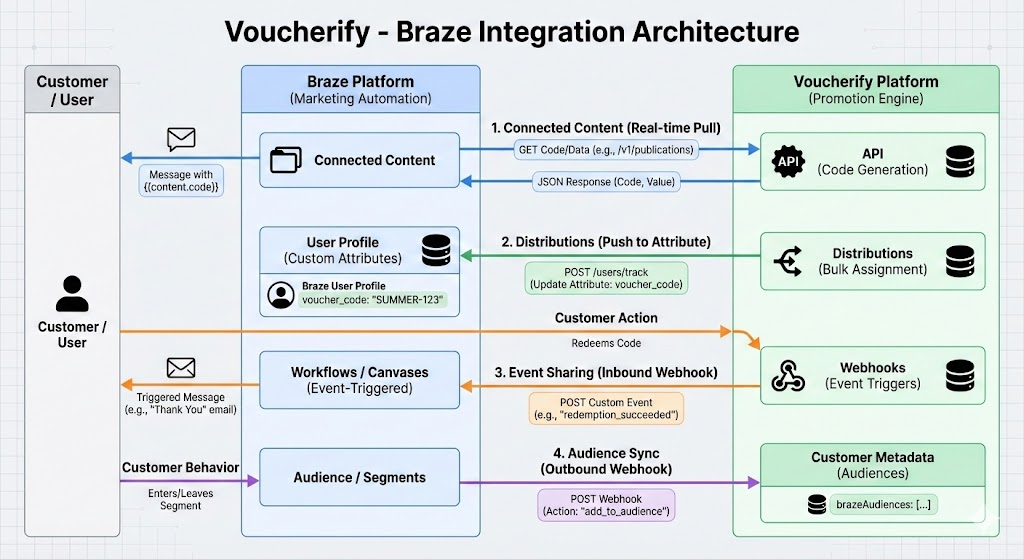 ## How does it work?
The Inbound integration enable you to send Voucherify events to Braze.
First, connect your Voucherify account with Braze.
1. Copy the REST API Key from your Braze account (it should at least have a permission `users.track`)
2. Go to the **Integrations** directory in your Voucherify dashboard\*\*, find Braze and choose **Connect**.
3. Paste the copied API Key from Braze and choose **Connect**.
## Events sent to Braze
The following list portrays the list of events sent to Braze.
* [`EVENTS.CUSTOMER.REDEMPTION.SUCCEEDED`](/api-reference/customer/redemption-succeeded)
* [`EVENTS.CUSTOMER.REDEMPTION.ROLLBACK.SUCCEEDED`](/api-reference/customer/redemption-rollback-succeeded)
* `EVENTS.CUSTOMER.REDEMPTION.FAILED`
* `EVENTS.CUSTOMER.REDEMPTION.ROLLBACK.FAILED`
* [`EVENTS.CUSTOMER.REWARD_REDEMPTIONS.CREATED`](/api-reference/customer/reward-redemptions-created)
* [`EVENTS.CUSTOMER.REWARD_REDEMPTIONS.COMPLETED`](/api-reference/customer/reward-redemptions-completed)
* [`EVENTS.CUSTOMER.PUBLICATION.SUCCEEDED`](/api-reference/customer/publication-succeeded)
* `EVENTS.CUSTOMER.PUBLICATION.FAILED`
* [`EVENTS.CUSTOMER.REWARDED.MAIN`](/api-reference/customer/rewarded)
* [`EVENTS.CUSTOMER.REWARDED.LOYALTY_POINTS`](/api-reference/customer/rewarded-loyalty-points)
* `EVENTS.CUSTOMER.VALIDATION.SUCCEEDED`
* `EVENTS.CUSTOMER.VALIDATION.FAILED`
## Tracking events
You can track events as follows.
### Historical search
Track events taking place in Braze by heading to **Data** > **Custom Events** in your Braze account or **Analytics** > **Custom Events Report** in a new view. Example of such an event would be action-based delivery.
Select the period of time and events that interest you from the available list (events that you send to Braze are automatically added to the search list).
### Customer-specific events
It is also possible to take a closer look at the actions performed by a specific user rather than general statistics by heading to **Users** > **User Search or Audience** > **Search Users** in a new view.
## Action based delivery
Trigger notifications to be sent based on custom events. In the second step of the campaign creation process, **Schedule**, you can select action-based delivery. This type of campaign lets you use your custom events. From the list select **Perform Custom Event** and add it as a trigger.
Then, another list will pop up with events that you have sent to Braze.
You can, as an example, send new codes to all customers who failed to redeem their vouchers and try to make up for their disappointment.
Campaigns may use a Connected Content script to publish a unique coupon code and send it in a Braze message. More information about it in this [article](/integrations/braze-connected-content).
## Update Voucherify customer segments
The Braze Outbound Integration allows for one-way customer data synchronization from Braze to Voucherify with Braze Canvas Webhooks. You can create promotions targeted at specific customer groups segmented in Braze.
This integration is based on a call to a dedicated URL on Voucherify’s side and will bring the customer's `audience_id` existing in Braze into Voucherify.
| Cluster | Webhook URL |
| ---------------------- | ------------------------------------------------------------------------------------------- |
| **Europe** | `https://braze.voucherify.io/braze/customer-webhook` |
| **United States** | `https://us1.braze.voucherify.io/braze/customer-webhook` |
| **Asia** | `https://as1.braze.voucherify.io/braze/customer-webhook` |
| **Remaining Clusters** | `https://{cluster}.braze.voucherify.io/braze/customer-webhook` (use your dedicated cluster) |
| Structure | Details |
| ------------------ | ----------------------------------------------------------------------------------------------------------------------------------------- |
| **Authentication** | • `applicationId`
## How does it work?
The Inbound integration enable you to send Voucherify events to Braze.
First, connect your Voucherify account with Braze.
1. Copy the REST API Key from your Braze account (it should at least have a permission `users.track`)
2. Go to the **Integrations** directory in your Voucherify dashboard\*\*, find Braze and choose **Connect**.
3. Paste the copied API Key from Braze and choose **Connect**.
## Events sent to Braze
The following list portrays the list of events sent to Braze.
* [`EVENTS.CUSTOMER.REDEMPTION.SUCCEEDED`](/api-reference/customer/redemption-succeeded)
* [`EVENTS.CUSTOMER.REDEMPTION.ROLLBACK.SUCCEEDED`](/api-reference/customer/redemption-rollback-succeeded)
* `EVENTS.CUSTOMER.REDEMPTION.FAILED`
* `EVENTS.CUSTOMER.REDEMPTION.ROLLBACK.FAILED`
* [`EVENTS.CUSTOMER.REWARD_REDEMPTIONS.CREATED`](/api-reference/customer/reward-redemptions-created)
* [`EVENTS.CUSTOMER.REWARD_REDEMPTIONS.COMPLETED`](/api-reference/customer/reward-redemptions-completed)
* [`EVENTS.CUSTOMER.PUBLICATION.SUCCEEDED`](/api-reference/customer/publication-succeeded)
* `EVENTS.CUSTOMER.PUBLICATION.FAILED`
* [`EVENTS.CUSTOMER.REWARDED.MAIN`](/api-reference/customer/rewarded)
* [`EVENTS.CUSTOMER.REWARDED.LOYALTY_POINTS`](/api-reference/customer/rewarded-loyalty-points)
* `EVENTS.CUSTOMER.VALIDATION.SUCCEEDED`
* `EVENTS.CUSTOMER.VALIDATION.FAILED`
## Tracking events
You can track events as follows.
### Historical search
Track events taking place in Braze by heading to **Data** > **Custom Events** in your Braze account or **Analytics** > **Custom Events Report** in a new view. Example of such an event would be action-based delivery.
Select the period of time and events that interest you from the available list (events that you send to Braze are automatically added to the search list).
### Customer-specific events
It is also possible to take a closer look at the actions performed by a specific user rather than general statistics by heading to **Users** > **User Search or Audience** > **Search Users** in a new view.
## Action based delivery
Trigger notifications to be sent based on custom events. In the second step of the campaign creation process, **Schedule**, you can select action-based delivery. This type of campaign lets you use your custom events. From the list select **Perform Custom Event** and add it as a trigger.
Then, another list will pop up with events that you have sent to Braze.
You can, as an example, send new codes to all customers who failed to redeem their vouchers and try to make up for their disappointment.
Campaigns may use a Connected Content script to publish a unique coupon code and send it in a Braze message. More information about it in this [article](/integrations/braze-connected-content).
## Update Voucherify customer segments
The Braze Outbound Integration allows for one-way customer data synchronization from Braze to Voucherify with Braze Canvas Webhooks. You can create promotions targeted at specific customer groups segmented in Braze.
This integration is based on a call to a dedicated URL on Voucherify’s side and will bring the customer's `audience_id` existing in Braze into Voucherify.
| Cluster | Webhook URL |
| ---------------------- | ------------------------------------------------------------------------------------------- |
| **Europe** | `https://braze.voucherify.io/braze/customer-webhook` |
| **United States** | `https://us1.braze.voucherify.io/braze/customer-webhook` |
| **Asia** | `https://as1.braze.voucherify.io/braze/customer-webhook` |
| **Remaining Clusters** | `https://{cluster}.braze.voucherify.io/braze/customer-webhook` (use your dedicated cluster) |
| Structure | Details |
| ------------------ | ----------------------------------------------------------------------------------------------------------------------------------------- |
| **Authentication** | • `applicationId`
• `secretKey`
*Note: Keys are available in Voucherify Dashboard → Project Settings → Application Keys.* |
| **HTTP Method** | POST |
| **Request Body** | The request body contains **3 required parameters**, the rest are optional. |
### Request Body Parameters/Data Mapping
| Parameter | Definition / Options / Mapping |
| --------------------------- | -------------------------------------------------------------------------------------------------------------------------------------------------------------------------------------------------------------------------------- |
| **action** (required) | • `"add"` to add members to the audience
• `"delete"` to remove members from the audience
This operation adds or removes the customer metadata field `brazeAudiences` from the customer’s profile in Voucherify. |
| **audience\_id** (required) | The `audience_id` can have any value from Braze Canvas. All customers in a segment will share the same audience ID stored in Voucherify customer metadata, for example:
`brazeAudiences: ["brazeAudienceID"]` |
| **user\_id** (required) | Braze `user_id` |
| **email\_address** | Maps directly to Voucherify's `email` field |
| **first\_name** | Concatenates with last name into the customer’s `name` field |
| **last\_name** | Concatenates with first name into the customer’s `name` field |
| **country** | Maps to Voucherify customer address (`country`) |
| **city** | Maps to Voucherify customer address (`city`) |
| **phone\_number** | Maps to Voucherify customer address (`phone`) |
| user\_id (required) | Braze `user_id` |
| email\_address | The email maps directly to Voucherify's email field |
| first\_name | The first name and last name will concatenate in Voucherify into the customer’s name field |
| last\_name | The first name and last name will concatenate in Voucherify into the customer’s name field |
| country | This maps directly to the customer's address in Voucherify (the country address parameter) |
| city | This maps directly to the customer's address in Voucherify (the city address parameter) |
| phone\_number | This maps directly to the customer's address in Voucherify (the phone parameter) |
## How to tie it all together in Braze
1. In Braze, [create a new Canvas](https://www.braze.com/docs/user_guide/engagement_tools/canvas/create_a_canvas/create_a_canvas/) using the [Canvas Flow](https://www.braze.com/docs/user_guide/engagement_tools/canvas/create_a_canvas/create_a_canvas/) editor
2. When you create a message, select Webhook with a blank template
3. Enter the URL of the endpoint in Webhook URL, i.e. `https://{cluster}.braze.voucherify.io/braze/customer-webhook`
4. Enter all the required parameters in the Request Headers
* applicationId: Application ID
* secretKey: Application Token
* HTTP Method: POST
5. Enter all the **required** parameters in the Request Body
* **action**: "add" to add members to the audience, or "delete" to remove members.
* **user\_id**: Use personalisation in the editor to add a Braze user ID, for example, `{{${user\_id}}}`.
* **audience\_id**: Type the ID of the audience to update, for example, 608.
## Sending events through Braze webhook messages
Build a [Canvas](https://www.braze.com/docs/user_guide/getting_started/campaigns_canvases/#canvas-flow) with a webbook as a message channel to send events to Voucherify through Braze.
For example:
* Mark a referral as complete by forwarding a Braze event to Voucherify,
* Give a voucher to a customer when they register on your website.
### Entry schedule, audience, and send settings
Configure when your users enter the Canvas and the sendout of the event to Voucherify.
1. Choose an entry schedule (when your users enter the Canvas) as [Action-Based](https://www.braze.com/docs/user_guide/engagement_tools/canvas/create_a_canvas/create_a_canvas/?tab=action-based%20delivery) – a user performs an action to enter the canvas.
2. Choose the custom event from the drop-down list.
3. Provide a start time when the users will start entering the Canvas.
4. In [Target Audience](https://www.braze.com/docs/user_guide/engagement_tools/canvas/create_a_canvas/create_a_canvas/?tab=action-based%20delivery#step-2c-set-your-target-entry-audience), choose All Users.
5. In [Send Settings](https://www.braze.com/docs/user_guide/engagement_tools/canvas/create_a_canvas/create_a_canvas/?tab=action-based%20delivery#step-2d-select-your-send-settings), choose All users including unsubscribed users.
### Build canvas
Configure your Canvas to send events from Braze to Voucherify.
1. In the flow, click Message.
2. In Messaging Channels, add a Webhook.
3. In the Settings tab, add the Braze integration keys from Voucherify.
* In Voucherify, go to Home and Project Settings.
* Scroll down to Integration Keys.
* Copy your integration keys.
4. In Braze, provide your X-App-Token and X-App-Id.
5. Choose the POST method.
6. In the Compose section, add `https://api.voucherify.io/v1/events` to the Webhook URL.
7. In the Request Body, form the proper payload for the [track event](/api-reference/events/track-custom-event) endpoint.
```json theme={null}
{
"event": "user_registered",
"customer": {
"source_id": "{{${user_id}}}"
}
}
```
8. Test the configuration by sending an event to a Braze profile. Check if it is forwarded to Voucherify.
Endpoint : [/users/track](https://www.braze.com/docs/api/endpoints/user_data/post_user_track/)
Payload:
```json theme={null}
{
"events": [
{
"external_id": "uniqueUserId",
"app_id": "xxxxxxxx-xxxx-xxxx-xxxx-xxxxxxxxxxxx",
"name": "user_registered",
"time": "2024-03-07T19:03:52Z"
}
]
}
```